
A HAR file is useful because it shows what the browser requested and what came back.
That same detail is why a HAR file deserves careful handling. It can include technical troubleshooting evidence, but it can also reveal session data, account identifiers, submitted form values, API responses, and internal URLs.
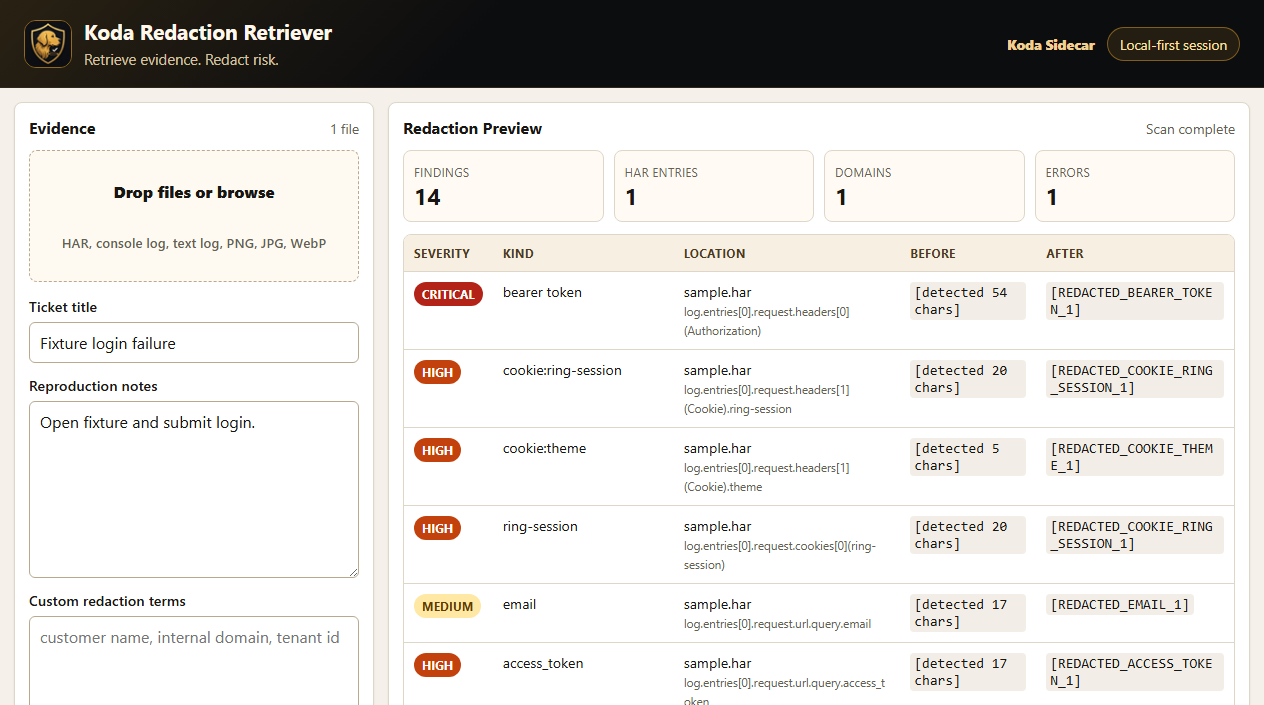
Screenshot: Redaction Retriever showing masked findings in a sample HAR review.
URLs and Query Parameters
The most obvious exposure is the URL.
That can include:
- Application paths.
- Tenant or workspace IDs.
- Email addresses.
- Search terms.
- Invite tokens.
- Password reset tokens.
- OAuth codes.
- API keys placed in a query string.
Even when headers are stripped, URLs can still reveal sensitive context. A path like /admin/customers/12345/billing may not expose a password, but it can expose the account, workflow, and area of the product involved.
Cookies and Session Tokens
Cookies can represent an active logged-in session. If a HAR includes cookie values, treat it like sensitive evidence.
Look for:
Cookie.Set-Cookie.- Session IDs.
- CSRF tokens.
- Refresh tokens.
- Vendor-specific auth cookies.
Modern Chrome excludes some sensitive headers from normal HAR exports by default, but sensitive HAR export can include more detail when enabled. Do not assume a HAR is safe just because it came from Chrome.
Authorization Headers
Authorization headers can expose bearer tokens, basic auth credentials, or API tokens.
Common patterns include:
Authorization: Bearer ...Authorization: Basic ...Proxy-Authorization.- Custom headers such as
X-Api-Key,X-Auth-Token, orX-Session.
If support needs to know whether an auth header existed, they often do not need the full value. A masked version can preserve the troubleshooting signal:
Authorization: Bearer [TOKEN_PRESENT]Request Bodies
Request bodies can include the exact data a user submitted.
Examples:
- Login form fields.
- Password fields.
- Profile updates.
- GraphQL variables.
- Uploaded metadata.
- Customer records.
- Search filters.
- Internal notes.
Request bodies are especially risky because the sensitive part may be buried inside JSON, form data, or encoded strings.
Response Bodies
Response bodies can be just as sensitive as requests.
They may include:
- User profile data.
- Account settings.
- Customer lists.
- Error payloads with internal IDs.
- Feature flags.
- HTML page content.
- API responses from private endpoints.
For troubleshooting, support may only need the error shape or status code. If the response body contains private data, mask fields while keeping the structure useful.
Timing, Redirects, and Hostnames
Not every risk is a secret string.
HAR files can also expose:
- Internal hostnames.
- API gateway paths.
- CDN or asset hostnames.
- Redirect chains.
- Identity provider domains.
- Timing details that show slow internal endpoints.
This kind of data may matter for security reviews, incident response, or vendor-sharing policies.
A Practical Review Order
Review HAR files in this order:
- URLs and query parameters.
- Cookies.
- Authorization and custom headers.
- Request bodies.
- Response bodies.
- Emails, customer names, IDs, and tenant identifiers.
- Internal hostnames and private URLs.
- Screenshots or notes bundled with the HAR.
Do not remove everything. Preserve enough request order, status codes, timing, and endpoint shape for support to diagnose the issue.
FAQ
Can a HAR file expose passwords?
Yes. Passwords can appear in request bodies, query parameters, logs, or unusual application fields. Review login and form-submission requests carefully.
Does Chrome remove sensitive data from HAR files?
Chrome excludes some sensitive data by default in normal exports, but sensitive data can still appear in URLs, bodies, identifiers, and application-specific fields.
Should I send a HAR file in a public ticket?
No. Treat HAR files as sensitive support evidence and use an approved private upload path.
Is masking enough?
Masking is useful, but review the result. Automated redaction can miss encoded payloads, uncommon field names, screenshots, and custom application data.
CTA
Redaction Retriever is Koda Sidecar's local-first workflow for reviewing HAR files, logs, screenshots, and support notes before sharing troubleshooting evidence.