
A HAR file can be the fastest way to troubleshoot a browser issue. It can also contain exactly the kind of data you do not want copied into a ticket.
Before sharing a HAR file with a vendor, customer, or internal team, sanitize it. Then review the sanitized result.
This guide explains what to look for and how to preserve enough troubleshooting value.
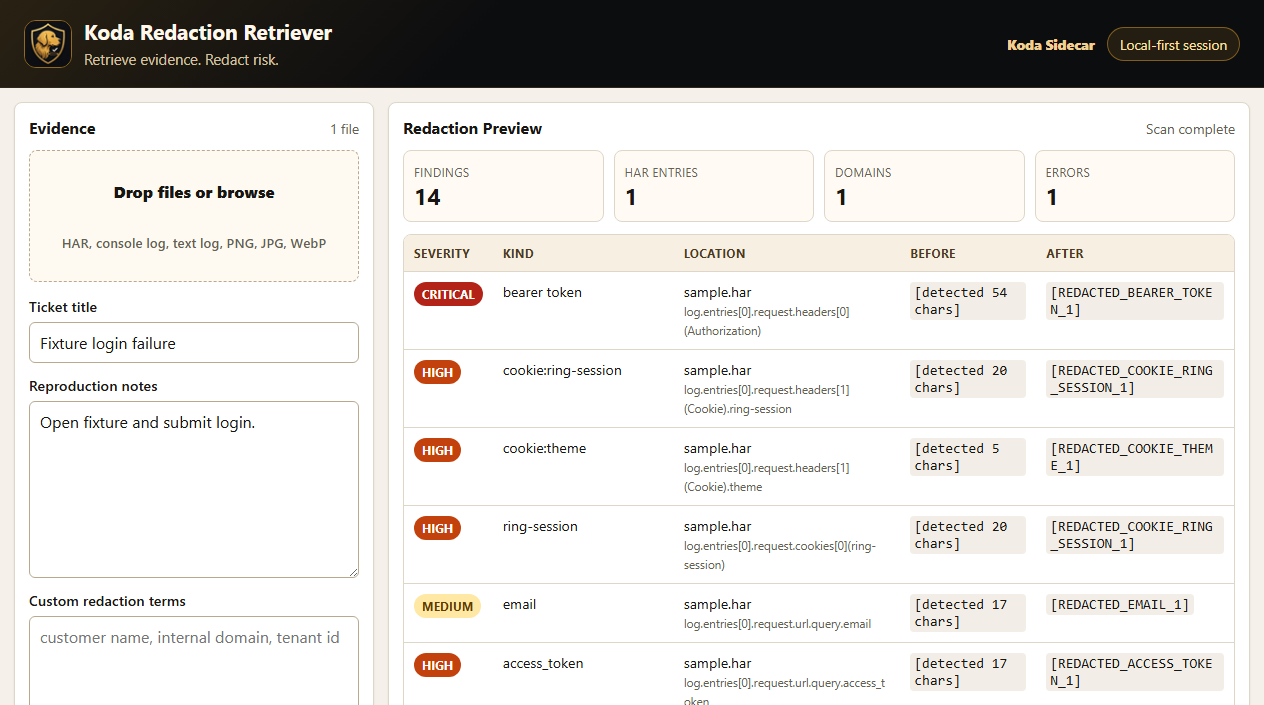
Screenshot: Redaction Retriever showing masked bearer tokens, cookies, emails, and access tokens in a sample HAR scan.
What Sanitizing a HAR File Means
Sanitizing a HAR file means removing or masking sensitive values while keeping the request flow useful.
The goal is not to erase everything. The goal is to protect secrets and personal data while preserving:
- Request order.
- Status codes.
- Timings.
- Domains or safe hostnames.
- Paths when safe.
- Error responses when safe.
- Redirect flow.
- Enough headers to understand behavior.
If the file becomes a blank shell, support may not be able to use it.
Sensitive Data to Look For
Review these areas first.
Cookies
Cookies can represent a logged-in browser session. Remove or mask cookie values.
Look for:
CookieSet-Cookie- HAR cookie arrays
- Session cookie names
Authorization Headers
Authorization headers can contain bearer tokens, basic auth, or other credentials.
Look for:
AuthorizationProxy-AuthorizationBearerBasic- JWT-looking values
Query Parameters
Secrets often appear in URLs.
Look for parameter names like:
tokenaccess_tokenapi_keycodesecretsignaturesessionpassword
Request and Response Bodies
Bodies can include form submissions, API payloads, customer records, or error details.
Review:
- Login requests.
- Profile updates.
- File uploads.
- GraphQL payloads.
- JSON responses.
- HTML responses.
Personal and Customer Data
Mask or remove:
- Email addresses.
- Phone numbers.
- Customer names.
- Account IDs if sensitive.
- Internal hostnames.
- IP addresses if policy requires it.
A Practical HAR Sanitization Checklist
- Keep an original copy in a secure location only if policy allows.
- Work on a copy, not the only file.
- Remove or mask cookies.
- Remove or mask authorization headers.
- Remove or mask API keys and tokens.
- Review query parameters.
- Review request bodies.
- Review response bodies.
- Review custom headers.
- Review domains and internal hostnames.
- Confirm the error request is still visible.
- Confirm status codes and timing remain useful.
- Share through an approved upload path.
What Not to Remove
Do not remove troubleshooting context unless it is sensitive.
Try to preserve:
- Request URLs or safe path shape.
- HTTP methods.
- Status codes.
- Redirect order.
- Timing.
- Initiator/resource type when available.
- Error response shape, if safe.
Example:
Original:
https://app.example.com/api/users?email=alice@example.com&access_token=abc123

Better sanitized:
https://app.example.com/api/users?email=[EMAIL]&access_token=[TOKEN]

Too destructive:
[REDACTED]
The better version still shows which endpoint was called.
Before and After: Sanitized HAR Example
Here is a small fake HAR-style example. The sanitized version preserves request shape, method, status, and timing while masking values that should not be shared casually.
Before:
{
  "request": {
    "method": "POST",
    "url": "https://app.example.com/api/login?email=alice@example.com&access_token=abc123",
    "headers": [
      { "name": "Authorization", "value": "Bearer eyJhbGciOi..." },
      { "name": "Cookie", "value": "session=live-session-token; theme=dark" }
    ],
    "postData": {
      "mimeType": "application/json",
      "text": "{\"password\":\"correct-horse-battery-staple\"}"
    }
  },
  "response": {
    "status": 403,
    "content": { "text": "{\"error\":\"invalid_session\"}" }
  }
}
After:
{
  "request": {
    "method": "POST",
    "url": "https://app.example.com/api/login?email=[EMAIL]&access_token=[ACCESS_TOKEN]",
    "headers": [
      { "name": "Authorization", "value": "[REDACTED_BEARER_TOKEN]" },
      { "name": "Cookie", "value": "session=[REDACTED_COOKIE]; theme=[REDACTED_COOKIE]" }
    ],
    "postData": {
      "mimeType": "application/json",
      "text": "{\"password\":\"[REDACTED_PASSWORD]\"}"
    }
  },
  "response": {
    "status": 403,
    "content": { "text": "{\"error\":\"invalid_session\"}" }
  }
}
How Chrome Defaults Affect Sanitization
Modern Chrome excludes some sensitive headers from normal HAR exports by default. That helps, but it is not a full sanitizer.
A HAR can still expose:
- Sensitive URLs.
- Query parameters.
- Payloads.
- Emails.
- Tenant identifiers.
- Response data.
- Other custom headers.
Do not assume a Chrome-exported HAR is safe without review.
When Support Needs Sensitive Data
Sometimes a support team needs auth context to diagnose an issue. For example, a login failure may depend on whether a cookie or authorization header was present.
In that case:
- Ask exactly what fields are required.
- Ask whether a secure upload path exists.
- Ask whether values can be partially masked.
- Ask whether a timestamped server-side log correlation can replace the secret.
- Share the minimum required evidence.
Security and support should not be enemies. They need a workflow.
FAQ
Can a HAR sanitizer miss sensitive data?
Yes. Sanitizers are best-effort. Always review the output, especially for screenshots, encoded payloads, unusual headers, and custom application fields.
Should I delete all response bodies?
Often yes for safety, but it depends on the issue. If the response body contains the error message needed for diagnosis, consider masking sensitive fields while preserving the error structure.
Is it safe to upload a HAR file to a third-party sanitizer?
Only if your company policy allows it and you trust the tool. Local-first or self-hosted workflows may be easier to approve for sensitive support evidence.
What if sanitizing breaks the HAR?
Keep the JSON structure valid. If manual edits break syntax, support tools may not be able to open the file.
CTA
Redaction Retriever by Koda Sidecar is designed for local HAR, log, screenshot, and support-evidence review before sharing.