
Fathom can capture the meeting. The harder part is turning that capture into follow-up that another person can trust.
For support, customer success, sales engineering, and technical founder workflows, meeting notes are only useful if they answer a few practical questions:
- What was decided?
- Who owns each next step?
- What context should land in the ticket, doc, or customer email?
- What can safely be archived for later?
This workflow is for teams that already use Fathom and want a lightweight way to move from recorded notes to reviewed follow-up.
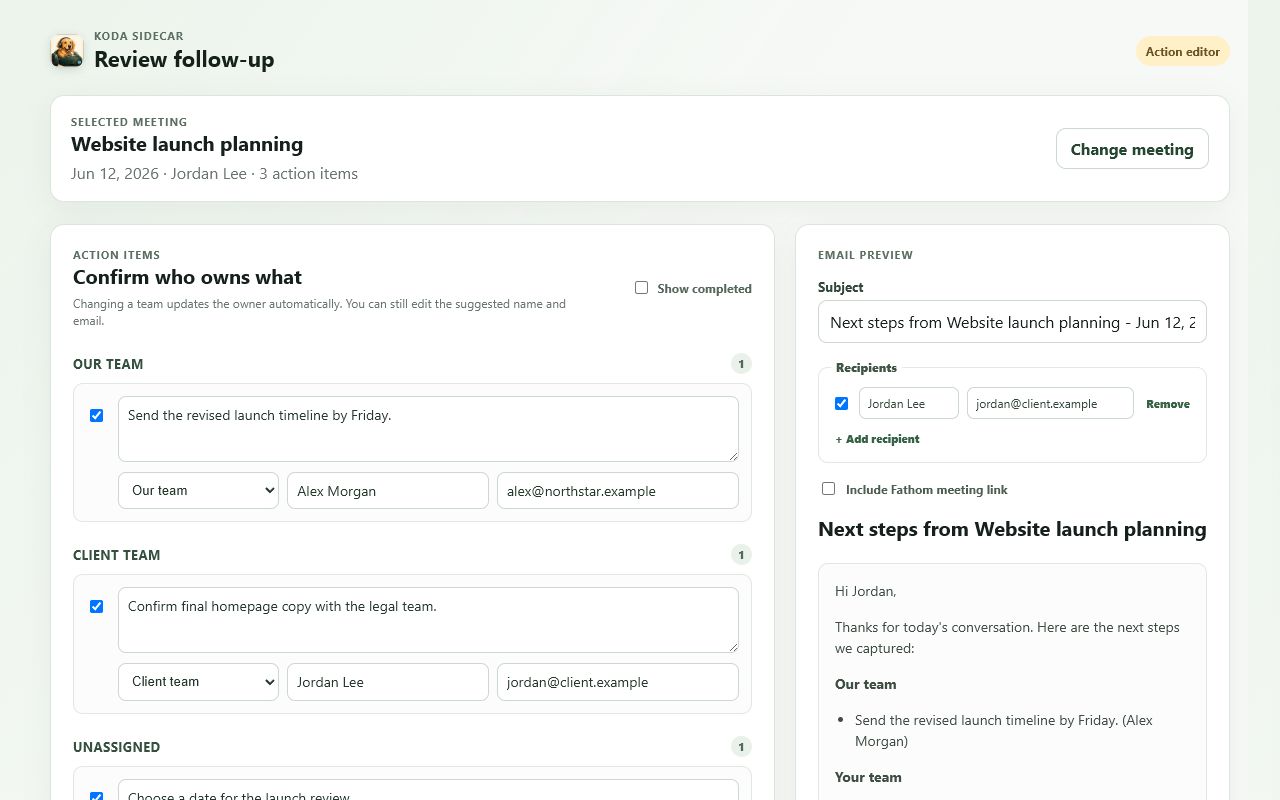
Screenshot: Koda Sidecar reviewing synthetic Fathom action items before drafting customer follow-up.
Why Fathom Notes Need a Workflow
AI meeting notes are helpful, but they are not the final artifact. They can miss owner context, merge separate tasks, phrase customer commitments too vaguely, or include internal notes that should not be sent back to the customer.
That does not make the notes bad. It means the meeting record needs a review step.
A useful Fathom workflow should:
- Preserve the original transcript and summary.
- Pull out decisions, risks, and commitments.
- Separate internal tasks from customer-facing follow-up.
- Turn action items into something assignable.
- Create an archive that can be found later.
The goal is not to create more process. The goal is to stop re-reading a 45-minute transcript every time someone asks what happened.
Step 1: Start With Meeting Context
Before editing action items, capture the basics:
- Customer or account name.
- Meeting date.
- Meeting type.
- Internal owner.
- External attendees.
- Main topic.
- Link back to the Fathom recording.
For example:
Account: Northwind Apps
Meeting: SSO troubleshooting review
Date: 2026-06-18
Internal owner: Sam
Type: support escalation
Source: Fathom recording link
This makes the exported note useful outside Fathom. A ticket, doc, or checklist should still make sense when someone opens it two weeks later.
Step 2: Separate Facts, Decisions, and Tasks
Do not treat every bullet as an action item.
Use three buckets:
- Facts: What happened or what the customer reported.
- Decisions: What the group agreed to do.
- Tasks: Work that needs an owner.
Example:
Fact: Customer sees intermittent 403 responses after SSO redirect.
Decision: Support will compare the HAR capture against the IdP logs.
Task: Sam will request a fresh HAR file with Preserve log enabled.
This helps prevent noisy follow-up. The customer does not need a task for every diagnostic observation.
Step 3: Review Owners and Due Dates
Fathom action items can be directionally useful, but owners still need review. Customer names, internal names, and implied ownership can get mixed together.
Before sending anything, check each task:
- Is the owner an internal person, customer, vendor, or shared team?
- Did the owner actually agree to do it?
- Is there a deadline or only an implied next step?
- Should the item appear in customer-facing follow-up?
- Does it belong in a ticket instead of an email?
A reviewed action item should read like this:
Owner: Support
Task: Compare the new HAR file against the IdP redirect logs.
Due: Before Thursday's escalation review.
Customer-facing: Yes
Not like this:
Follow up on HAR.Step 4: Write the Follow-Up Email From Reviewed Items
The best customer follow-up is short. It should confirm the shared understanding, list next steps, and avoid re-litigating the whole meeting.
Use this format:
Subject: Follow-up from SSO troubleshooting review

Hi Jordan,

Thanks for walking through the SSO behavior today. Here is what I have captured:

Confirmed:
- The 403 appears after the IdP redirect, not before login starts.
- The issue is intermittent and affects two customer admins.

Next steps:
- Support will compare a fresh HAR capture against the IdP redirect logs.
- Northwind will reproduce the issue with Preserve log enabled and share the sanitized HAR.

I'll update the ticket after reviewing the capture.
Notice what is missing: no raw transcript, no unnecessary internal theory, and no unreviewed AI wording.
Step 5: Export a Durable Meeting Record
After follow-up, save a record for internal use. A durable record is not just a transcript. It should include:
- Meeting metadata.
- Summary.
- Decisions.
- Reviewed action items.
- Original Fathom link.
- Transcript, if needed for audit or handoff.
- Any ticket or doc links created from the meeting.
For technical teams, Markdown is often the easiest archive format. CSV works well for action-item rollups. JSON is useful when another tool will process the record.
Checklist: Fathom Notes to Follow-Up
Use this before sending a customer-facing update:
- Meeting title and date are correct.
- Customer/account name is included.
- Internal-only notes are removed from the customer email.
- Each action item has an owner.
- Customer-owned tasks are phrased as requests, not accusations.
- Any dates or deadlines are explicit.
- Ticket/doc links are included when helpful.
- Fathom recording link is kept in the internal archive.
- Email draft is reviewed before sending.
Workflow Variations by Team
Support Teams
Support teams should prioritize evidence, reproduction steps, and ticket updates. The meeting note should answer: "What do we need to troubleshoot next?"
Best outputs:
- Ticket comment.
- Escalation summary.
- HAR or log request checklist.
- Internal reproduction notes.
Sales Engineering
Sales engineers should prioritize technical requirements, objections, and solution fit.
Best outputs:
- Mutual action plan.
- Security questionnaire notes.
- Integration requirements.
- Proof-of-concept checklist.
Customer Success
Customer success teams should prioritize commitments, blockers, and adoption risks.
Best outputs:
- Account plan update.
- Renewal risk note.
- Customer-facing recap.
- Internal handoff to support or product.
Technical Founders
Founders should prioritize signal. A transcript is useful, but the real value is extracting patterns across calls.
Best outputs:
- Product feedback note.
- Repeated pain points.
- Feature request evidence.
- Follow-up email.
FAQ
Should I send Fathom notes directly to customers?
Usually no. Treat Fathom notes as source material. Review the summary, remove internal context, verify action items, and send a shorter follow-up.
Should every meeting get archived?
No. Archive important customer calls, support escalations, implementation calls, sales engineering sessions, and any meeting with durable commitments.
What file format should I use?
Use Markdown for human-readable notes, CSV for task rollups, JSON for automation, and ZIP when you need a complete meeting archive.
Can AI meeting notes replace ticket updates?
Not reliably. They can speed up the first draft, but support tickets need clean evidence, status, owners, and next diagnostic steps.
CTA
Koda Sidecar's Fathom Action Items & Exporter is an independent workflow tool for reviewing Fathom action items, drafting follow-up, and exporting meeting records from Chrome.
Review every generated follow-up before sending.