
A transcript is not a task list.
That distinction matters. Fathom transcripts are useful because they preserve what was said. Action items are useful because they tell someone what to do next. The work in between is where customer follow-up often gets messy.
This guide walks through a practical way to turn a Fathom transcript into reviewed action items for technical teams.
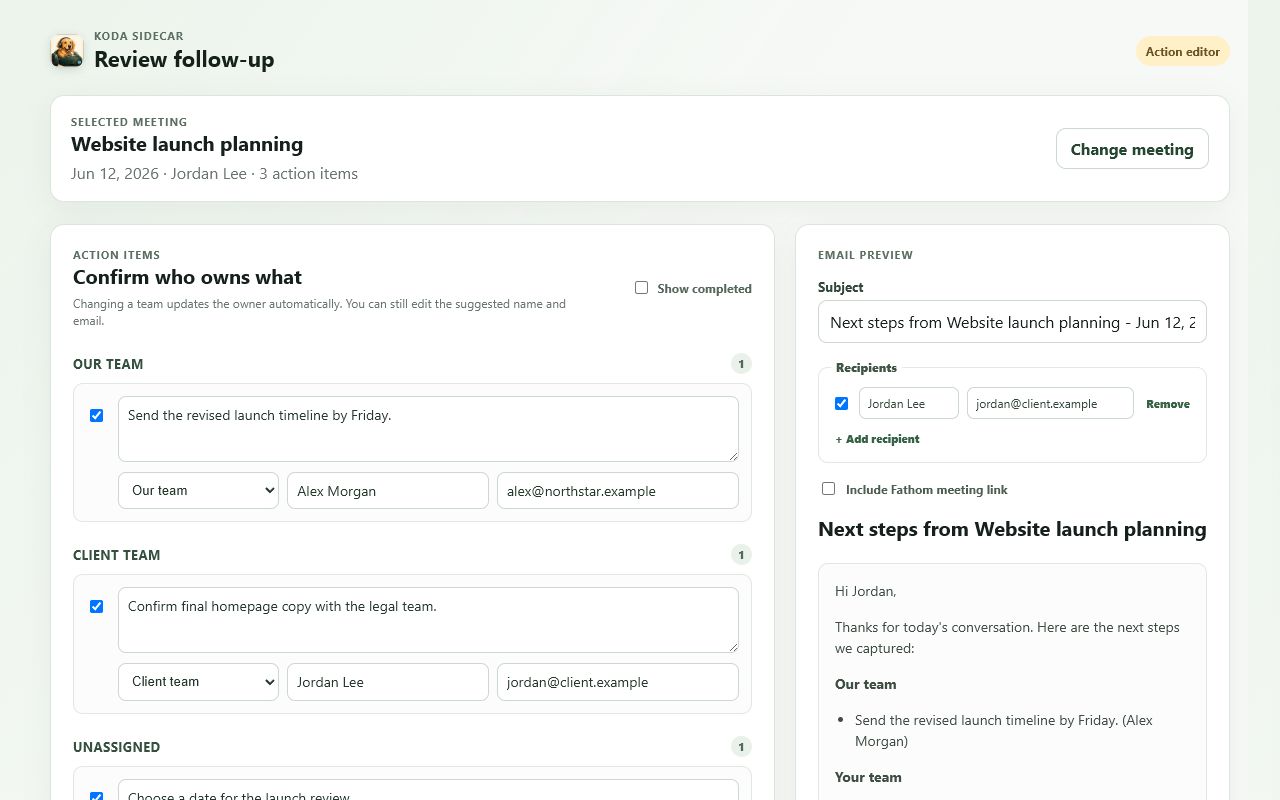
Screenshot: Koda Sidecar showing reviewed owners, action-item text, and the resulting follow-up draft.
Start With the Meeting Outcome
Before extracting tasks, name the meeting outcome in one sentence.
Examples:
- "Customer reproduced the SSO redirect error and support agreed to inspect a fresh HAR."
- "Sales engineering confirmed the integration requirements for the proof of concept."
- "Customer success identified two adoption blockers before renewal."
This sentence becomes a filter. If a possible task does not support the outcome, it may belong in notes rather than the action list.
Scan for Commitment Language
Action items usually appear near commitment language:
- "I'll send..."
- "Can you share..."
- "We need to check..."
- "Let's follow up..."
- "The next step is..."
- "I'll ask the team..."
But commitment language is not enough. People also brainstorm, speculate, and ask rhetorical questions in meetings.
Before creating a task, verify:
- Someone agreed to do it.
- The task has a clear object.
- The task moves the work forward.
- The owner can be identified.
- The task is not just a general topic.
Convert Conversation Into Task Shape
Use a consistent action item format:
Owner:
Task:
Context:
Due:
Customer-facing:
Source:
Example:
Owner: Support
Task: Review the HAR capture for failed POST requests during login.
Context: Customer sees intermittent 403 responses after SSO redirect.
Due: Before Thursday's escalation review.
Customer-facing: Yes
Source: Fathom transcript at 00:18:42
The source timestamp is optional, but it helps when someone needs to verify the context.
Separate Four Types of Transcript Signals
1. Explicit Tasks
These are direct commitments.
Example:
"I'll send the updated implementation checklist after this call."Action item:
Owner: Implementation lead
Task: Send the updated implementation checklist.
2. Diagnostic Tasks
These are common in support calls.
Example:
"We should compare this against a HAR from a successful login."Action item:
Owner: Support
Task: Compare failed and successful HAR captures for the login flow.
3. Decision Records
These are not tasks, but they should be preserved.
Example:
"Let's keep SAML enabled and test SCIM separately next week."Decision:
Decision: Keep SAML enabled and test SCIM separately.4. Open Questions
These are not tasks until someone owns the answer.
Example:
"Do we know whether the mobile team uses the same auth path?"Open question:
Question: Does the mobile app use the same auth path?
Owner needed: Product or engineering.
Avoid Common Action-Item Mistakes
Mistake: Making the Task Too Broad
Weak:
Investigate login.Better:
Compare the failed login HAR against IdP redirect logs and note the first request that returns 403.Mistake: Assigning Ownership Based on Mention Order
If the customer mentions a problem first, that does not mean the customer owns the fix.
Confirm ownership from the agreement, not the transcript sequence.
Mistake: Sending Internal Tasks to the Customer
Some tasks are real but should remain internal.
Example:
Ask engineering whether this is related to the token refresh bug.That belongs in the internal handoff, not the customer recap.
Mistake: Treating AI Output as Final
AI-generated action items are a draft. Review names, deadlines, context, and customer-facing language before using them.
A Review Workflow for Technical Teams
- Read the meeting summary.
- Identify the meeting outcome.
- Review AI-generated action items.
- Skim the transcript around each action item.
- Add missing diagnostic tasks.
- Move decisions into a decision section.
- Move questions into an open questions section.
- Mark tasks as customer-facing or internal.
- Draft the follow-up.
- Archive the reviewed version.
This sounds like work, but it is faster than rediscovering the meeting later.
Example: Before and After
Transcript excerpt:
Customer: We can reproduce it if we keep the Network tab open.
Support: Great. Can you send the HAR after reproducing it?
Customer: Yes, but we'll need to remove cookies first.
Support: Perfect. I'll compare it to the last successful login trace.
Reviewed action items:
Owner: Customer
Task: Reproduce the login issue with the Network tab open and share a sanitized HAR.
Customer-facing: Yes

Owner: Support
Task: Compare the new HAR against the last successful login trace.
Customer-facing: Yes
Internal note:
If the new HAR omits Authorization and Cookie headers, confirm whether the browser exported a sanitized HAR by default.FAQ
Do I need the full transcript to create action items?
Not always. Start with the summary and generated action items. Use the transcript to verify ambiguous tasks, owner assignments, and customer commitments.
Should action items include timestamps?
For routine follow-up, no. For escalations, product evidence, or disputed context, timestamps are helpful.
What if Fathom misses an action item?
Add it manually. The reviewed action list matters more than preserving the original AI-generated output.
Should completed action items be included?
Only if they explain current status. Otherwise, keep the follow-up focused on open next steps.
CTA
Koda Sidecar's Fathom Action Items & Exporter helps review Fathom action items, adjust owners, draft follow-up, and export records without treating AI notes as final.