
Exporting meeting notes is easy to postpone until someone needs an answer from three months ago.
Then the question becomes: Which customer said that? Was it a decision or just an idea? Did we ever send the follow-up? Is the transcript in Fathom, the ticket, a doc, or someone's inbox?
A good Fathom notes export workflow should make the meeting useful outside the recording tool. The goal is not to hoard files. The goal is to create a record that support, customer success, sales engineering, and founders can actually use.
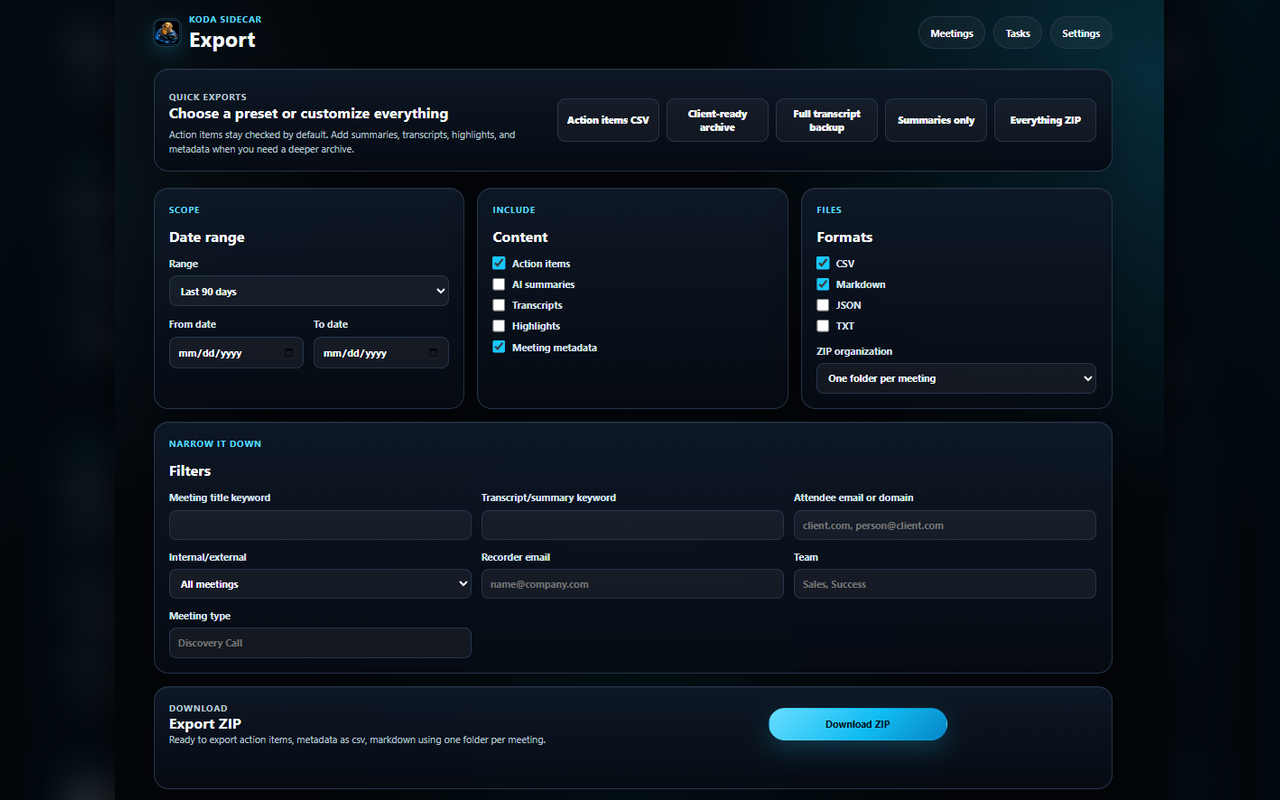
Screenshot: Koda Sidecar's export workspace showing CSV, Markdown, JSON, TXT, and ZIP archive options.
What to Export From Fathom
For most teams, a useful meeting export includes five layers:
- Metadata: title, date, recording ID, participants, recorder, meeting link.
- Summary: the short narrative version of what happened.
- Action items: tasks, owners, status, and follow-up notes.
- Highlights: important moments worth preserving.
- Transcript: the detailed source of truth when the summary is not enough.
You do not need every layer for every meeting. A quick internal sync might only need action items. A high-value customer escalation might need the full archive.
Choose the Right Export Format
Different formats solve different problems.
Markdown
Use Markdown when a person needs to read the export.
Best for:
- Customer recap drafts.
- Internal handoff notes.
- Docs.
- Lightweight knowledge base entries.
Markdown is also easy to paste into GitHub issues, Notion, Linear, Jira comments, and support tickets.
CSV
Use CSV when the export needs to be sorted, filtered, or reported.
Best for:
- Action item lists.
- Account-level follow-up reviews.
- Support escalation tracking.
- Meeting inventory.
CSV is a poor format for full transcripts, but it is excellent for task rollups.
JSON
Use JSON when another tool or script will process the meeting data.
Best for:
- Internal automations.
- Data warehouse imports.
- Custom dashboards.
- Repeatable migration workflows.
JSON should preserve structure. Do not flatten everything if you expect to use it later.
ZIP Archive
Use ZIP when a meeting needs a complete handoff package.
Best for:
- Escalations.
- Implementation handoffs.
- Customer onboarding packages.
- Backup archives.
A ZIP can include Markdown, CSV, JSON, TXT, and supporting files in one folder.
Use a Predictable Naming Convention
Bad file names make archives useless. Use names that sort cleanly and survive being copied between systems.
Recommended pattern:
YYYY-MM-DD-account-meeting-topicExample:
2026-06-18-northwind-sso-troubleshootingInside the folder:
summary.md
action-items.csv
metadata.json
transcript.txt
highlights.md
This is boring in the best possible way. Anyone can understand it.
Keep Customer-Facing and Internal Notes Separate
One of the easiest mistakes is mixing internal diagnostic notes with customer-facing recap language.
Use two sections or two files:
customer-follow-up.mdinternal-notes.md
Customer-facing notes should include:
- Confirmed facts.
- Agreed next steps.
- Customer-owned tasks.
- Internal-owned tasks that are safe to share.
Internal notes can include:
- Risk flags.
- Suspected root causes.
- Account history.
- Product gaps.
- Escalation context.
This separation matters for trust.
Organize by Workflow, Not by Tool
If the archive is only organized around Fathom, it may not match how the team works.
Consider organizing by:
- Customer account.
- Ticket or case number.
- Project.
- Quarter.
- Meeting type.
- Internal owner.
For support and customer success teams, account-first organization usually works best.
Example:
customers/
  northwind/
    2026-06-18-sso-troubleshooting/
      summary.md
      action-items.csv
      transcript.txt
For product research, topic-first organization may be better:
research/
  browser-authentication/
    2026-06-18-northwind-sso-troubleshooting/
Add a Meeting Index
If you export more than a handful of meetings, create an index.
Minimum useful columns:
- Date.
- Account.
- Meeting title.
- Meeting type.
- Internal owner.
- Fathom URL.
- Archive path.
- Open action item count.
- Ticket/doc links.
This gives the team one place to search before opening individual folders.
Practical Export Checklist
- Decide whether the meeting needs action items only or a full archive.
- Use a stable folder and file naming convention.
- Include metadata with the Fathom link.
- Separate customer-facing recap from internal notes.
- Review action item owners.
- Export CSV for task tracking.
- Export Markdown for readable handoff notes.
- Export transcript only when the detail is needed.
- Store the archive where the team already looks for account or ticket context.
FAQ
Should I export every transcript?
Not necessarily. Full transcripts are useful for escalations, compliance-sensitive handoffs, product research, and high-value customer meetings. For routine calls, a reviewed summary and action list may be enough.
Is CSV enough for Fathom exports?
CSV is useful for action items and metadata. It is not ideal for long summaries or transcripts because context gets flattened.
Where should Fathom exports live?
Put them near the workflow that needs them: ticket system for support, CRM/account workspace for customer success, docs for implementation, or a research folder for product discovery.
Should customers receive the full meeting archive?
Usually no. Send a concise recap and next steps. Keep the full archive internal unless there is a clear reason to share it.
CTA
Koda Sidecar's Fathom Action Items & Exporter is an independent Chrome workflow for reviewing Fathom action items and exporting meeting records into practical file formats.